Arduino character art on LCD
March 8, 2011 4 Comments
The posts on arduino forum by JO3RI inspired me to make the following:
I used an arduino, Phi-1 shield, and phi-menu to create some animation art. His arts were very awesome but mine is lame. Anyway, here it is:
Here is how I constructed my codes with my latest Arduino Phi-menu software. The code download is in the end:
We need three menu items:
1. Display the animated arts
2. Set parameters, such as speed of the animation, forward or backward, and which animation to play
3. Display credits.
First, take a quick look at the FUNCTIONS.pde
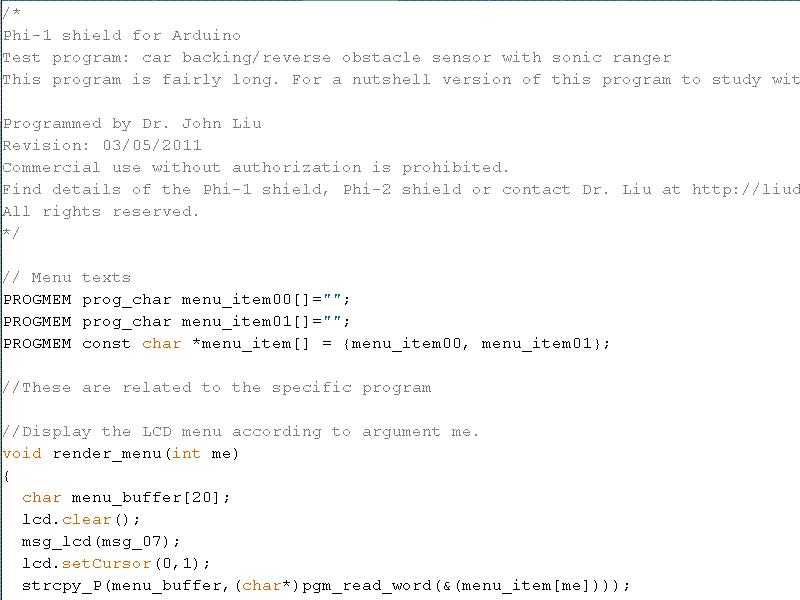
Then add your menu texts in the menu_item00 and menu_item01 strings (in red) and add more menu items as you need (in green) . Make sure you enumerate all these strings in the later array (in green).

Now define some variables that you will be using in your program here after the comment line (in green).

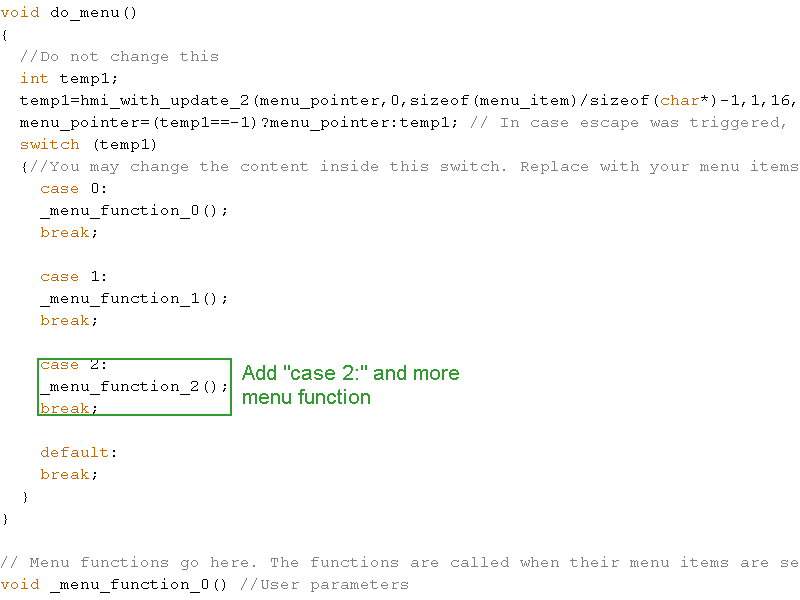
Scroll down in FUNCTIONS.pde and find the switch command. Make sure you add additional menu items in the function (in green).
We code the parameters function first. We have three parameters, delays, art_number, and _forward. In parameters function (menu_function_0), we need to ask user to adjust each parameter at a time. You first prompt the user with a string such as “Delays” (in red) so the user knows what he is adjusting. Then you assign the value of the parameter, such as “delays”, to a temporary variable para_val (in purple). This way if the user changes the value and decides to escape, the original value of delays is not disturbed. Then invoke the hmi function. It handles everything, displays the current value of the parameter, sets the up and down keys to change the value, with lower and upper limits, and step size per key press. Once the user is happy with the value, it returns. Details of how to use the hmi function is in the documentation.
The last line in the block updates the parameter only if the user presses confirm. If the user actually escapes, the parameter is not changed.

In the body of the FUNCTIONS.pde, you will define menu_function_1. such as the following image:

In the body of the FUNCTIONS.pde, you will define menu_function_2. such as the following image:

Source code: