New phi-panel face plates are on their ways

Recently I have been contacted by various individuals regarding using the phi-panel LCD back pack with rotary encoders and buttons instead of matrix keypad. So I thought about it, and made the firmware change to accommodate that. It was covered in a previous post. Now that I have these different firmwares that support different key layouts, I felt that I should complete the circle by adding these layouts to new face plates.
Tada!

These two layouts are for 20X4 and 16X2 phi-panel LCD backpacks. I designed new PCBs to accommodate a rotary encoder with a switch on the shaft (press down) and up to 6 additional buttons. Now you can use a rotary encoder, and up to 5 buttons at any of the 6 locations.

Why having 6 locations but only allowing up to 5 buttons? There are 8 connections on the phi-panel. These are originally intended for the 4*4 matrix keypad. Now with the above new key layouts, these buttons are used as the following:

Encoder channel A, encoder channel B, encoder switch, button 1, button 2, button 3, button 4, button 5. After the encoder, there are only 5 connections left anyway. But to give you the freedom to arrange keys, I have 6 locations. For the locations that you don’t want a key, simply tape it. The laser cut face plate contains 6 discs each at a button hole. Just tape those discs in the back and that hole is covered! I like the layout to be symmetric so you can flip the face plate and use the other side, because one side is glossy, and the other side is matte! Didn’t I think of everything?! Of course I conveniently neglected all the screw holes in the above rendering but they are included on the actual panels. Use black screws if you want for the look.

At the moment, I looked up and down a few US suppliers and ebay for rotary encoder knobs but I can’t seem to find the single most attractive ones with no lines or marks on them so I will not include knobs and let you choose any size up to 1.25 inch diameter or 31.5mm in diameter. There are lots of them.

Next are two layouts with directional keys:

There are 4 holes arranged in u/d/l/r and there are 2 additional holes on the top and 2 on the bottom. You can do your u/d/l/r/ and pick any of the free holes for enter or use all 8 holes for 8 buttons. The key arrangement of the corresponding firmware will be:

Up/down/left/right/enter/1/2/3

Once I get these face plates, I will give a demonstration of each one of them, how to wire them up and how to flash different firmware to go between these configurations.

More about different LCD backpacks

Last time I discussed what serial LCD to buy. This time, as a response to some Arduino forum questions regarding I2C LCDs, I’ve written the following short comparison to prove that serial LCDs are better choice than I2C LCDs in most projects.

First, there is no official I2C liquid crystal library. Anything not included in arduino IDE 1.0 is contributed by one person or another and some get active support but the rest don’t so they are dead. Most ebay sellers are just selling I2C LCDs because they think they make money selling but not able to do any support and that’s why I put support at top priority. Just read comments on my blog you will see. Unfortunately mine is not I2C (IE cheapest, for good reasons). Just to clarify, although you can get a lib for an I2C LCD, the library goes with the particular I2C LCD and is not useful if you switch to another I2C LCD. Also arduino still does the heavy lifting to communicate with the LCD so your code will be long with the included lib and arduino spends processing time to do the LCD control. On the other hand, serial LCDs (on TTL serial) require no library so there won’t be a time when you want lib and the lib is not up to date and won’t compile. Also the serial LCD controller does all the heavy lifting for arduino. Your code is small since there’s no lib to include. Those are some of the reasons I make and sell serial LCDs and not I2C IO extender LCDs.

Two different I2C LCDs and why one is so much cheaper than the other/serial LCD:
1) LCD with I2C IO port extender (cheap). The port extender is a buck each. There is no “brain” on this type of I2C LCDs. The extender simply adds more IO ports to arduino. Arduino still does all heavy lifting and is prone to long compiled sketch and broken library problems.
2) LCD with controller that talks I2C with arduino (expensive). The controller is a few bucks and needs support such as crystal caps etc. There is a “brain” on this type of I2L LCDs. The controller does all heavy lifting so arduino has short sketch but there is still potential for broken library problems since most of these come with libraries to tell the controller what to do.

3) Then the serial LCD. It’s around the same price and complexity as 2) in terms of price and sometimes a serial LCD offers I2C connectivity as well. It’s not prone to broken library since everything is sent in serial text streams and arduino also has short sketch. You can also connect this type of LCD directly to a PC with a USB TTL adapter! The input and output are both asynchronous and buffered against overflow on arduino and serial LCD. — I’d go with this one, especially the best ones, designed by Liudr. 😉

Update:

Reply from brunialti at Arduino forum (agreed to be reposted here):

That is a really good introduction on choosing an lcd!
I like your approach, and I saw your serial LCD. There is a lot of “brain” inside. I think that it could be the appropriate choice for many projects and you tempted me to buy it (damn!).
On my side, as I’m going to integrate as many I2c device as possible, I would prefer not to manage two interfaces at the same time. The I2c has a strong point on its bus. You can buy a passive, small and cheap backplane and connect all the i2c devices you like, using 4 mu pins at all!

There is also a drawback in putting too much “brain” into devices: with the “brain” you put also logics, syntax and structure. That make impossible a drop-in substitution of a smart LCD with an other one.
That is similar to the broken library problem: you have to change the app code instead of the library code.

My reply to brunialti:

Very good points! Indeed I worried about that (different serial LCDs speak different commands), so, I have used all ANSI escape codes as much as I can so all functions are ANSI escape code driven or ASCII control code driven. So if you want to clear screen, that is \f (old speak for printer to spit out the entire sheet and ready a new sheet, feed). If you want to change LCD coordinates, you do the ANSI escape sequence “CSI n ; m H”, which is say “\e[2,4H” for 2 row and 4 column with 1-based numbers. I wish every serial LCD speaks ANSI, which is by far the most appropriate standard for a character display, but only few do and mine speaks the most ANSI words. All specific functions such as menus and scrolling texts are also implemented as custom ANSI escape sequence for maximal standardization. I’m pretty sure Sparkfun serial LCD won’t speak ANSI since it has a big brain but little intelligence inside. smiley-wink

http://en.wikipedia.org/wiki/ANSI_escape_code

Serial LCD backpack

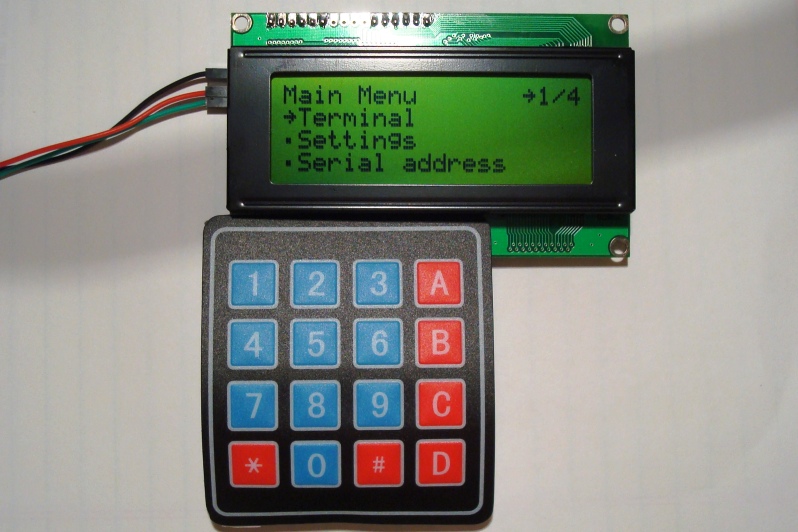
Since my success on phi-panels with integrated keypads, I’ve decided to make a serial LCD backpack as well. This backpack will support membrane matrix keypads and buzzer off board with all the same great features of the original phi-panels, just cheaper and more flexible if you want the serial backpack to make the least impact to how your project has been set up. Here it is:

At the moment, I only have 16*2 and 20*4 displays in stock but you should have no problem with 20*2 display and 40*2 displays. If in the rare occasion your display has double row pin holes, you can always solder wires between your display and the backpack.

You can set the size of the display over serial or on the on-board menu, with a 4*4 membrane matrix keypad.

This is the cheapest serial backpack out there. The I2C backpacks sold by adafruit etc. don’t have any processors on them so they will waste your arduino just as much time and FLASH space to operate as a parallel display. With the vast 24KB on-board firmware and functions, this backpack trumps any of its competitors!

I am offering these for sale on inmojo at the moment, although if you are interested in trading with me (I collect old CPUs, in the early 1990’s and earlier), I can trade with you as well. Read this post if you are interested in exchange:

Exchange!