Custom characters on phi-panel

You can use all custom characters on phi-panels as long as you are not using them in a long message, which uses custom characters to display the scroll bar on the right.

You can do the following:

When you need to use custom characters, follow the sample code phi_panel_big_show between lines 167 and 189. The last command in that function prints “\eZ~” to the panel to reinitialize the panel’s internal custom characters. Otherwise you will see your custom characters in place of the scroll bar 🙂

You will need the custom character definitions in your code as well so:
The code may be a bit messed up by the blog posting restrictions but you can find original code in the beginning and between lines 167 and 189 of the sample code phi_panel_big_show.

PROGMEM prog_char ch0[]={B110,B100,B100,B110,B100000,B1010,B10101,B10101,0};// cm
PROGMEM prog_char ch1[]={B11011,B10011,B11011,B11011,B11011,B11011,B10001,B11111,0};//Inverted 1
PROGMEM prog_char ch2[]={B10001,B1110,B11110,B11101,B11011,B10111,B100000,B11111,0};//Inverted 2
PROGMEM prog_char ch3[]={B100000,B11101,B11011,B11101,B11110,B1110,B10001,B11111,0};//Inverted 3
PROGMEM prog_char ch4[]={B11101,B11001,B10101,B1101,B100000,B11101,B11101,B11111,0};//Inverted 4
PROGMEM prog_char ch5[]={B10,B100,B1000,B10011,B100,B10,B1,B110,0};// /s
PROGMEM prog_char ch6[]={B100000,B100000,B100,B1110,B11111,B100,B100,B100000,0};//Up arrow
PROGMEM prog_char ch7[]={B100000,B100000,B100,B100,B11111,B1110,B100,B100000,0};//Down arrow
PROGMEM const char *ch_item[] = {ch0, ch1, ch2, ch3, ch4, ch5, ch6, ch7};

byte ch_buffer[10];

void demo_custom_char()

{
for (byte i=0;i {
strcpy_P((char*)ch_buffer,(char*)pgm_read_word(&(ch_item[i])));
Serial.print(“\eS”); // Start custom character sequence
Serial.print(i,DEC); // Indicate the custom character to create
for (byte j=0;j {
Serial.write(ch_buffer[j]|0x80); // Add a 1 to MSB to make sure the custom character definition is always beyond a numerical value of 31 to avoid a confusion with control characters.
}
Serial.write(‘~’);
}
Serial.print(‘\f’); // Clear screen
Serial.print(“Custom character “);
for (byte i=0;i {
Serial.write(i);
}
delay(5000);
Serial.print(“\eZ~”); // Reinitialize phi_prompt since the long message requires custom characters;

}

HVAC project

One phi-panel user is using the panel to control his DIY HVAC system at home. Here is a video of his project in progress:

This is very cool!

He is nearly done so I expect more videos 🙂

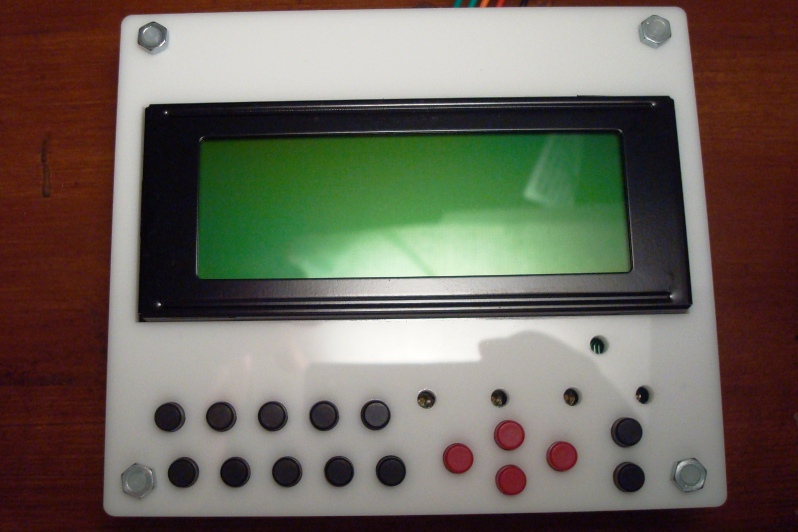
Phi-panel face plates

Face plates are coming out! These are white 3mm acrylic face plates made from laser cutting. I didn’t choose color since I thought I could just paint the white to any color I wanted. Well, I don’t really have a spray painting can :((

If you want to make them, just leave a message here. I’ll be posting the design file in a while.

This is the design file in Corel Draw 11 (super old version). It should export into the .svg file for laser cutting at ponoko.com with the 180mm*180mm service (cheapest) if you also have Corel Draw. Otherwise, download the .svg file. I am not sure what software to use to modify .svg if you want some changes though.

To make it, set up an account at ponoko.com and choose acrylic (3mm thickness suggested).

Contains 2 16×2 face plate, 1 20×4 face plate, and one arduino uno support.

Corel Draw file:

http://code.google.com/p/phi-panel/downloads/detail?name=phi-panel_faceplate_v3.cdr&can=2&q=

Exported .svg file:

http://code.google.com/p/phi-panel/downloads/detail?name=phi-panel_faceplate_v3.svg&can=2&q=

Suggested push buttons: EG1861-ND, caps: EG1882-ND, EG1881-ND, EG1880-ND. All these are digikey.com part numbers. These are the cheapest ones I could find.
Suggested spacers: M3 thread 8mm spacing and M3 screw: 25509K-ND, H742-ND.

Serial LCD backpack

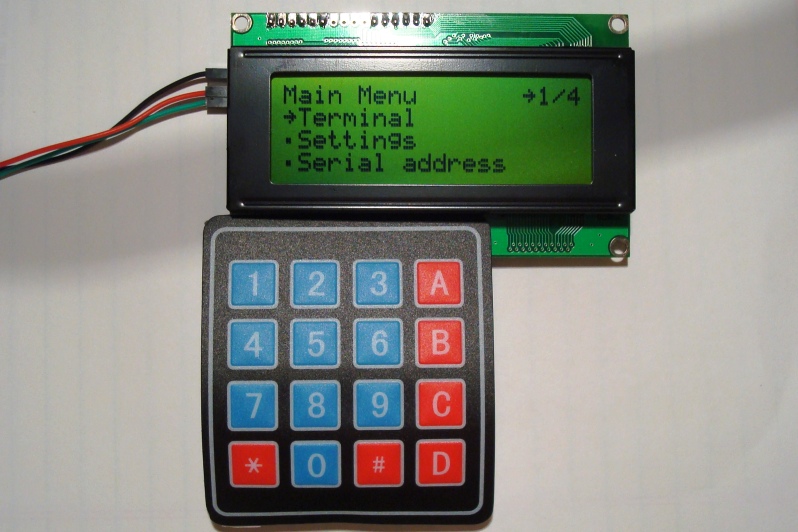
Since my success on phi-panels with integrated keypads, I’ve decided to make a serial LCD backpack as well. This backpack will support membrane matrix keypads and buzzer off board with all the same great features of the original phi-panels, just cheaper and more flexible if you want the serial backpack to make the least impact to how your project has been set up. Here it is:

At the moment, I only have 16*2 and 20*4 displays in stock but you should have no problem with 20*2 display and 40*2 displays. If in the rare occasion your display has double row pin holes, you can always solder wires between your display and the backpack.

You can set the size of the display over serial or on the on-board menu, with a 4*4 membrane matrix keypad.

This is the cheapest serial backpack out there. The I2C backpacks sold by adafruit etc. don’t have any processors on them so they will waste your arduino just as much time and FLASH space to operate as a parallel display. With the vast 24KB on-board firmware and functions, this backpack trumps any of its competitors!

I am offering these for sale on inmojo at the moment, although if you are interested in trading with me (I collect old CPUs, in the early 1990’s and earlier), I can trade with you as well. Read this post if you are interested in exchange:

Exchange!

New multi-tap keypad

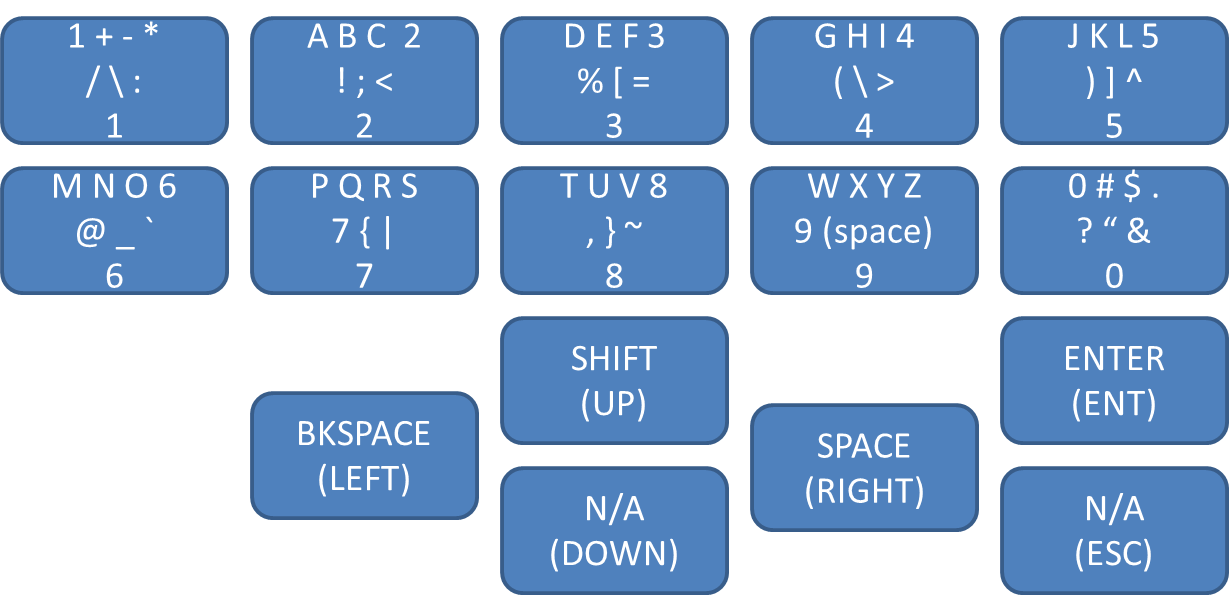
After a Phi-panel user (Daniel) has requested for more symbols on the multi-tap keyboard, I added all symbols to the keypad, why not? 🙂

Now the keypad has 7 symbols for each numeric key except for 9, with 6 symbols only. The symbols such as greater and less, brackets, parentheses, and curly braces, are all symmetrically located so if you get used to the pad, say memorized “(” is 5 presses on key “4”, then the “)” will be also 5 presses on the next key, “5”. Again all + – * / are located together on key 1.

On HD44780 displays, the ‘~’ and the ‘\’ are displayed as right arrow and the Japanese Yen (HD probably means Hitachi display). That’s unfortunate. Hope that would be a big deal for most of us.

New keypad:

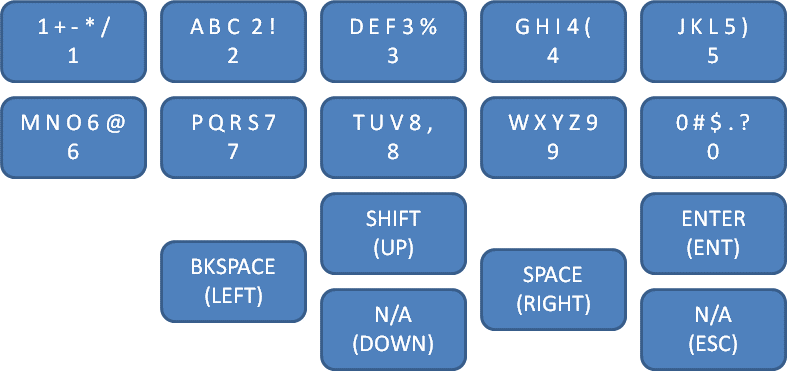
Old keypad:

To update your panel firmware, please go to the google code download page to download the firmware and follow the steps in the wiki page at the code site for updating. If you have questions, leave them here so I can answer them. Thanks.

http://code.google.com/p/phi-panel/wiki/updateFirmware